A few years ago I started a website and to my delight, the SEO efforts I was making to grow it were yielding results. However, one day I checked my rankings, and got the shock of my life. It had fallen, and badly.
I was doing my SEO right and I felt that was enough, but I didn’t know there was more. I hadn’t paid attention to my website security, and I didn’t even know that it mattered when it comes to Google and its ranking factors. Also, there were other security concerns I wasn’t paying attention to. As far as I was concerned back then, it didn’t matter since I had good content.
Obviously I was wrong, and I now know that if you really want to rank higher and increasing your site’s search traffic, then you need to understand that there is more to it than just building links and churning out more content. Understanding Google’s algorithm and it’s ranking factors are crucial.
Currently, Google has over 200 ranking factors they consider when they want to determine where to rank a site. And as expected, one of them is about how protected your site is. According to them, website security is a top priority, and they make a lot of investments all geared towards enduring that all their services, including Gmail and Google Drive, use top-notch security and other privacy tools by default all in a bid to make the internet a safer place generally.
Unfortunately, I was uninformed about these factors until my rankings started dropping. Below are four things you can do to protect your site.
Four steps to get started on website security
1. Get security plug-ins installed
On average, a typical small business website gets attacked 44 times each day, and software “bots” attack these sites more than 150 million times every week. And this is for both WordPress sites and even for non-WordPress websites.
Malware security breaches can lead to hackers stealing your data, data loss, or it could even make you lose access to your website. And in some cases, it can deface your website and that will not just spoil your brand reputation, it will also affect your SEO rankings.
To prevent that from happening, enhance your website security with WordPress plugins. These plugins will not just block off the brute force and malware attacks, they will harden WordPress security for your site, thus addressing the security vulnerabilities for each platform and countering all other hack attempts that could pose a threat to your website.
2. Use very strong passwords
As much as it is very tempting to use a password you can easily remember, don’t. Surprisingly, the most common password for most people is still 123456. You can’t afford to take such risks.
Make the effort to generate a secure password. The rule is to mix up letters, numbers, and special characters, and to make it long. And this is not just for you. Ensure that all those who have access to your website are held to the same high standard that you hold yourself.
3. Ensure your website is constantly updated
As much as using a content management system (CMS) comes with a lot of benefits, it also has attendant risks attached. According to this Sucuri report, the presence of vulnerabilities in CMS’s extensible components is the highest cause of website infections. This is because the codes used in these tools are easily accessible owing to the fact that they are usually created as open-source software programs. That means hackers can access them too.
To protect your website, make sure your plugins, CMS, and apps are all updated regularly.
4. Install an SSL certificate
If you pay attention, you will notice that some URLs begin with “https://” while others start with “http://”. You may have likely noticed that when you needed to make an online payment. The big question is what does the “s” mean and where did it come from?
To explain it in very simple terms, that extra “s” is a way of showing that the connection you have with that website is encrypted and secure. That means that any data you input on that website is safe. That little “s” represents a technology known as SSL.
But why is website security important for SEO ranking?
Following Google’s Chrome update in 2017, sites that have “FORMS” but have no SSL certificate are marked as insecure. The SSL certificate, “Secure Sockets Layer” is the technology that encrypts the link between a browser and a web server, protects the site from hackers, and also makes sure that all the data that gets passed between a browser and a web server remains private.

A normal website comes with a locked key in the URL bar, but sites without SSL certificates, on the other hand, have the tag “Not Secure”. This applies to any website that has any form.
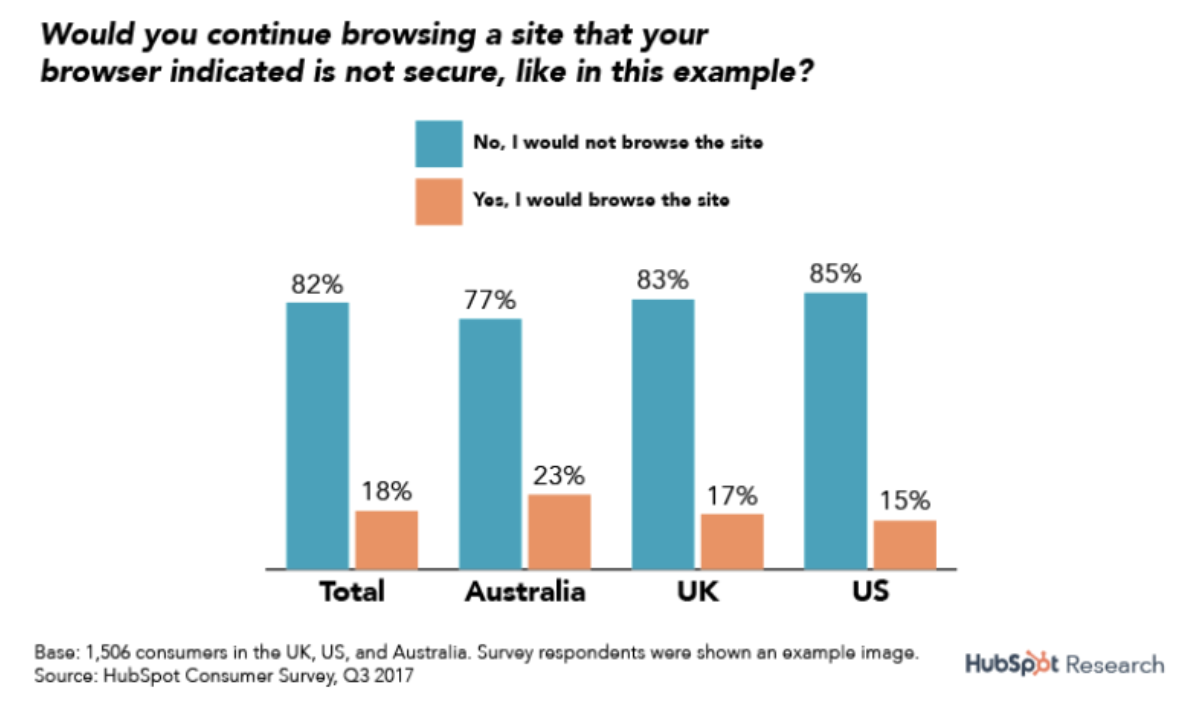
According to research carried out by Hubspot, 82% of those that responded to a consumer survey stated that they would leave a website that is not secure. And since Google chrome already holds about 67% out of the whole market share, that is a lot of traffic to lose.
Technically, the major benefit of having Hypertext Transfer Protocol Secure (HTTPS) instead of Hypertext Transfer Protocol (HTTP) is that it gives users a more secure connection that they can use to share personal data with you. This adds an additional layer of security which becomes important especially if you are accepting any form of payment on your site.
To move from HTTP to HTTPS you have to get an SSL certificate (Secure Socket Layer certificate) installed on your website.
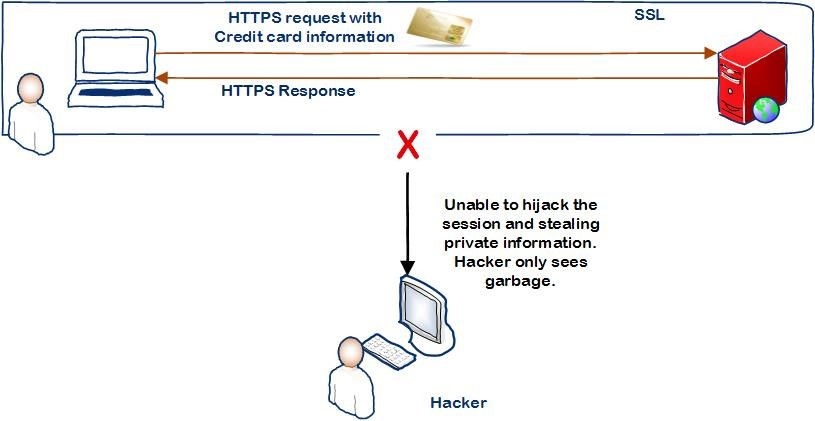
Once you get your SSL certificate installed successfully on a web server and configured, Google Chrome will show a green light. It will then act as a padlock by providing a secure connection between the browser and the webserver. For you, what this means is that even if a hacker is able to intercept your data, it will be impossible for them to decrypt it.
Security may have a minor direct effect on your website ranking, but it affects your website in so many indirect ways. It may mean paying a little price, but in the end, the effort is worth it.
The post Why website security affects SEO rankings (and what you can do about it) appeared first on Search Engine Watch.
from Search Engine Watch https://ift.tt/34k5ZVX
Comments
Post a Comment